Copy-paste carpenter visiting card prompt for ChatGPT or Gemini: upload your logo, fill your name, services and phone, get a print-ready card. A carpenter card with furniture jobs and a warm teak accent.
ChatGPTGemini16:9Added 11 Nov 2026
BeforeAfter
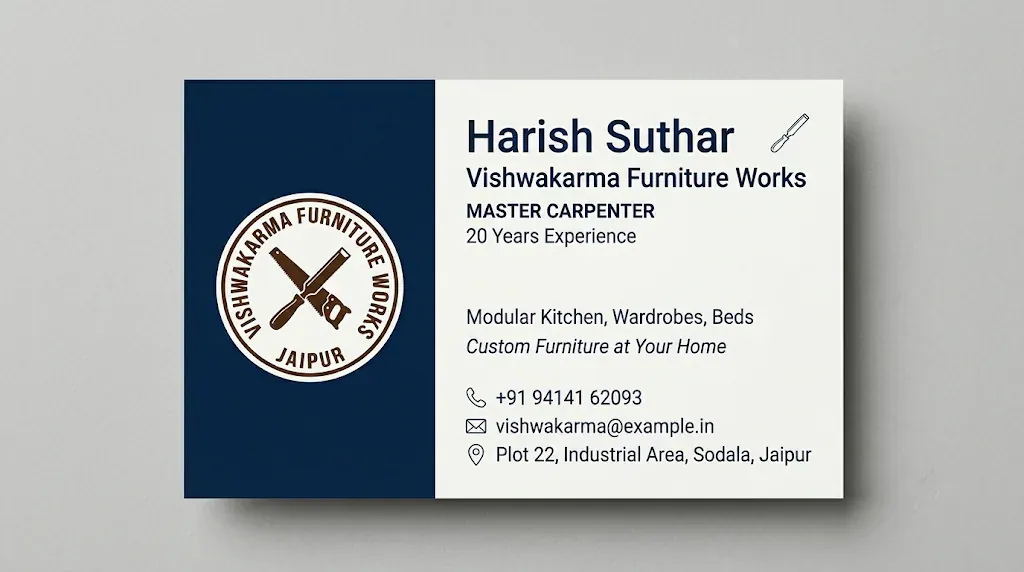
Example made by AI from this prompt, using a placeholder logo and demo details. Results vary with your photo and the tool. How we make and check examples
A professional product photo of one printed visiting card for a carpenter, seen straight from above, filling most of the 16:9 frame on a planed teak board beside wood shavings, soft daylight, a faint natural shadow, crisp sharp type; one card only. Art-directed like a top design studio, never a printing-shop template. Style "Split Panel": heavy matte stock; the left third is one solid brand-colour panel holding only the logo, centred; the right two thirds are off-white with the name block at the top and the contact lines at the bottom, all on one left edge; clean neo-grotesk sans; warm and solid, a wood-grain feel in the stock. Layout: logo centred in the left colour panel; a workshop composition, services as furniture jobs (modular kitchen, wardrobes, repairs), the experience line under the name; generous margins, max three type sizes, max two typefaces, perfect alignment. Logo: my uploaded logo, exact, modest, nothing behind it. Name block: "[PERSON NAME]" largest; "[COMPANY NAME]" second, smaller. If provided, small caps under the name: [DESIGNATION]. If provided, licence or experience below it: [QUALIFICATION]. If provided, services, one line, max 3: [SERVICES]. If provided, one small italic line: [TAGLINE]. If provided, phone, with one plain handset icon and no WhatsApp icon: [PHONE]. If provided, WhatsApp, with one WhatsApp icon: [WHATSAPP]. If provided, email, with one envelope icon: [EMAIL]. If provided, address, last line, with one map-pin icon: [ADDRESS LINE]. If provided, social handle with a tiny Instagram icon: [SOCIAL HANDLE]. If provided, city after the address: [CITY]. Contact lines: small, one thin outline icon each in the text colour, no circles or word labels; if the phone and WhatsApp numbers are the same, show it once. If provided, palette from: [BRAND COLOURS]. If no brand colours are given, use deep navy and off-white, with teak brown as the only accent. At most one tiny saw line icon; no other decoration. No waves, gradients, ribbons, gloss or clip art. Every detail appears exactly once; spell exactly; no other text, fake numbers or QR codes. If the logo cannot stay exact, leave its space empty.
A professional product photo of one printed visiting card for a carpenter, seen straight from above, filling most of the 16:9 frame on a planed teak board beside wood shavings, soft daylight, a faint natural shadow, crisp sharp type; one card only. Art-directed like a top design studio, never a printing-shop template. Style "Centred Classic": thick ivory cotton stock; everything centred on one axis: logo small at the top, the name large in a refined serif, the role in small tracked caps, one short hairline rule, then the contact details as one or two centred lines of small text separated by thin dots; warm and solid, a wood-grain feel in the stock. Layout: logo small, top centre; a workshop composition, services as furniture jobs (modular kitchen, wardrobes, repairs), the experience line under the name; generous margins, max three type sizes, max two typefaces, perfect alignment. Logo: my uploaded logo, exact, modest, nothing behind it. Name block: "[PERSON NAME]" largest; "[COMPANY NAME]" second, smaller. If provided, small caps under the name: [DESIGNATION]. If provided, licence or experience below it: [QUALIFICATION]. If provided, services, one line, max 3: [SERVICES]. If provided, one small italic line: [TAGLINE]. If provided, phone, with one plain handset icon and no WhatsApp icon: [PHONE]. If provided, WhatsApp, with one WhatsApp icon: [WHATSAPP]. If provided, email, with one envelope icon: [EMAIL]. If provided, address, last line, with one map-pin icon: [ADDRESS LINE]. If provided, social handle with a tiny Instagram icon: [SOCIAL HANDLE]. If provided, city after the address: [CITY]. Contact lines: small, one thin outline icon each in the text colour, no circles or word labels; if the phone and WhatsApp numbers are the same, show it once. If provided, palette from: [BRAND COLOURS]. If no brand colours are given, use ivory and deep ink, with teak brown as the only accent. At most one tiny saw line icon; no other decoration. No waves, gradients, ribbons, gloss or clip art. Every detail appears exactly once; spell exactly; no other text, fake numbers or QR codes. If the logo cannot stay exact, leave its space empty.
A professional product photo of one printed visiting card for a carpenter, seen straight from above, filling most of the 16:9 frame on a planed teak board beside wood shavings, soft daylight, a faint natural shadow, crisp sharp type; one card only. Art-directed like a top design studio, never a printing-shop template. Style "Dark Edge": full-bleed solid deep colour, never a gradient; logo top left, the name large at the bottom left in off-white sans; the contact lines stacked at the bottom right, right-aligned, separated from the name by one thin vertical line; warm and solid, a wood-grain feel in the stock. Layout: logo top left; a workshop composition, services as furniture jobs (modular kitchen, wardrobes, repairs), the experience line under the name; generous margins, max three type sizes, max two typefaces, perfect alignment. Logo: my uploaded logo, exact, modest, nothing behind it. Name block: "[PERSON NAME]" largest; "[COMPANY NAME]" second, smaller. If provided, small caps under the name: [DESIGNATION]. If provided, licence or experience below it: [QUALIFICATION]. If provided, services, one line, max 3: [SERVICES]. If provided, one small italic line: [TAGLINE]. If provided, phone, with one plain handset icon and no WhatsApp icon: [PHONE]. If provided, WhatsApp, with one WhatsApp icon: [WHATSAPP]. If provided, email, with one envelope icon: [EMAIL]. If provided, address, last line, with one map-pin icon: [ADDRESS LINE]. If provided, social handle with a tiny Instagram icon: [SOCIAL HANDLE]. If provided, city after the address: [CITY]. Contact lines: small, one thin outline icon each in the text colour, no circles or word labels; if the phone and WhatsApp numbers are the same, show it once. If provided, palette from: [BRAND COLOURS]. If no brand colours are given, use one deep brand colour with off-white type, with teak brown as the only accent. At most one tiny saw line icon; no other decoration. No waves, gradients, ribbons, gloss or clip art. Every detail appears exactly once; spell exactly; no other text, fake numbers or QR codes. If the logo cannot stay exact, leave its space empty.
Copy the prompt, upload your photo in the AI app, then paste.
How to use it
Fill your business name, your name and the details you want on the card; leave the rest blank.
Put your years of experience in qualification and your furniture jobs in services.
Open ChatGPT or Gemini, upload your logo and paste the copied prompt.
Check the phone and WhatsApp digits.
Fix one inside every wardrobe or kitchen cabinet you build.
Privacy tip
AI tools may use uploads to improve their services; check the tool's privacy settings. Use only photos you own or have consent for, and do not upload photos of children.
About this prompt
Colours used if you give none
Split Panel: deep navy and off-white, with teak brown as the only accent
Centred Classic: ivory and deep ink, with teak brown as the only accent
Dark Edge: one deep brand colour with off-white type, with teak brown as the only accent
A rule built into this design
At most one tiny saw line icon; no other decoration.
Size and shape
The prompt asks for 16:9, which is wide landscape, close to the 3.5 x 2 inch shape of a standard visiting card, so the card fills the frame.
How the example image was made
We ran the Split Panel version of this prompt in an AI image tool. The “before” image is a placeholder logo, standing in for the logo you upload. The demo details were the name “Harish Suthar”; your version uses your own name, logo and details. Both images are AI-generated and show the kind of result to expect, not a guarantee.
Problems and questions
It looks like a painter card.
Keep the teak accent and saw icon.
A word or number is misspelt
Reply: fix the spelling of this exact text, keep everything else the same, then paste the correct text.
My logo was redrawn or changed
Ask it to place the uploaded logo exactly as given, or use the empty space it leaves and add the logo in Canva.
The card looks too crowded
Remove some services or one contact line and generate again; three to five services read best.
Make it yours
Swap one line of the prompt to change the look:
Change the tagline to "Same Day Service" or "Free Inspection"List only your top four servicesAdd your WhatsApp number instead of a second phoneTry "Ivory Serif" for a premium foil or textured look, or "Deep Solid" for a cleaner card
 PhotoPromptly