Cinco de Mayo Post for Business – AI Prompt with Logo
Copy-paste prompt for a bright, clean Cinco de Mayo post or special for your restaurant or shop, with your logo. Works in Gemini and ChatGPT.
ChatGPTGemini1:1Added 16 Nov 2026
BeforeAfter
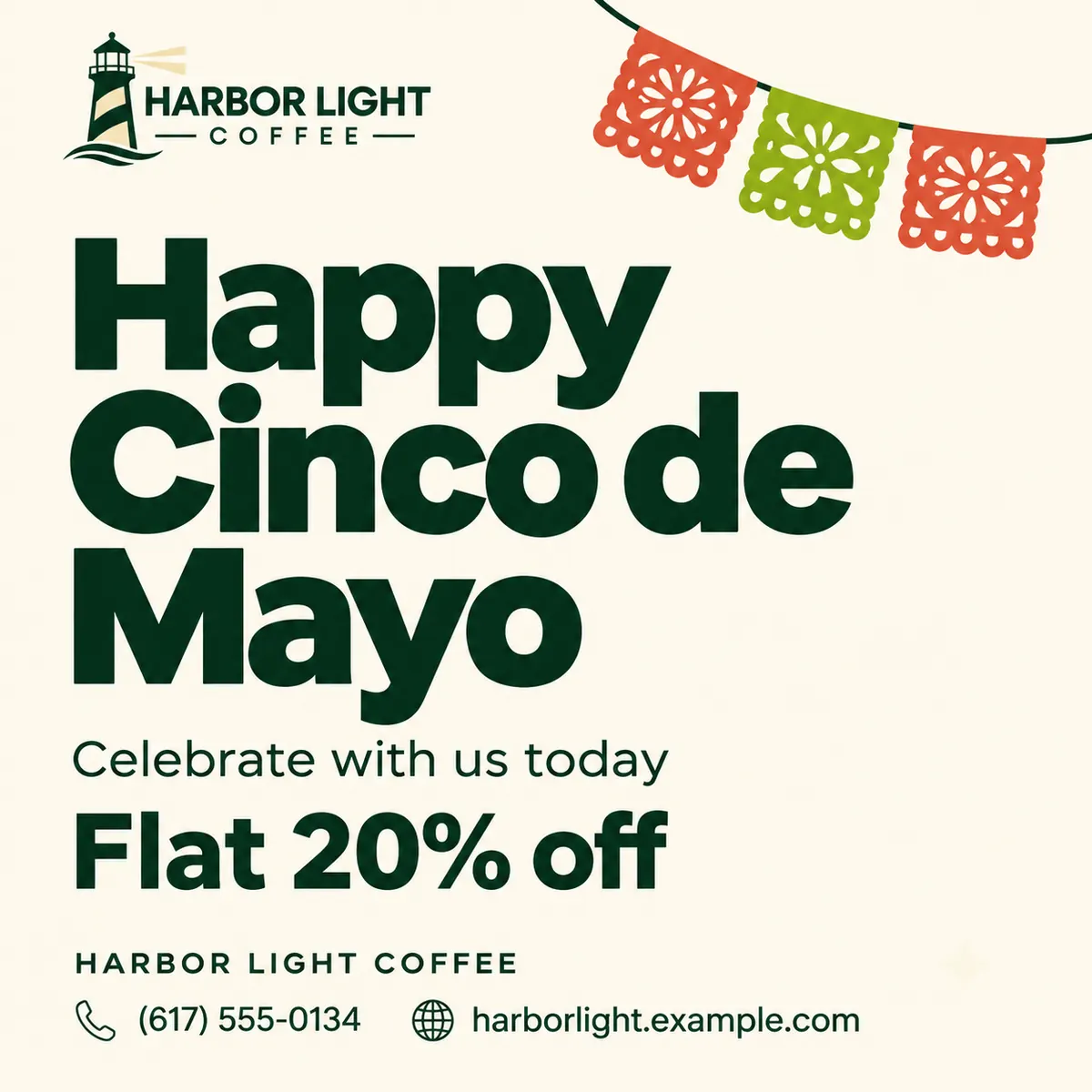
Example made by AI from this prompt, using a placeholder logo and demo details. Results vary with your photo and the tool. How we make and check examples
Create a [POST SIZE] brand post for [COMPANY NAME], art-directed like a top agency, never a poster-app template. Style "Bold Type": solid brand colour, the headline as huge confident sans type spanning the width, with a real photographed object overlapping the letters for depth, like a retail brand campaign, never a flyer. Hero: only papel picado, as a real photographed object overlapping the giant headline. No sombreros, cartoons or stereotypes. Layout: generous margins, one alignment, lots of calm empty space. The hero is a crafted focal visual that fills a large part of the canvas; never a lone icon, arrow, line or clip-art symbol on empty space; turn any abstract idea into a real object that expresses it; no text ever overlaps the hero; the design fills the frame edge to edge with no outer border. Logo: my uploaded logo, exact, small, at [LOGO POSITION], with no circle or box. If provided, palette: [BRAND COLOURS]. If no brand colours are given, use terracotta, lime green and warm white. Headline, the largest text, in the display face: "Happy Cinco de Mayo", with "Celebrate with us today" below in small text. If provided, set this offer as a clean second line of type under the headline, no badge or sticker: [OFFER]. Bottom: "[COMPANY NAME]" in small caps. Contact line: one quiet row of small text with tiny outline icons. If provided, phone, with one plain handset icon and no WhatsApp icon: [PHONE]. If provided, website, with one globe icon: [WEBSITE]. If provided, address line: [ADDRESS LINE]. If provided, email: [EMAIL]. If provided, WhatsApp number with a tiny WhatsApp icon: [WHATSAPP]. If provided, social handle with a tiny Instagram icon: [SOCIAL HANDLE]. No glitter, bokeh, glossy 3D, gold gradients, badges, ribbons, shadows, frames or clip art. Render only these words, spelled exactly; no other text, numbers, labels or measurements.
Create a [POST SIZE] brand post for [COMPANY NAME], art-directed like a top agency, never a poster-app template. Style "Studio Campaign": a luxury campaign studio photograph: deep matte backdrop, soft directional light, true reflections; refined serif headline in clean negative space. Hero: only a bowl of limes and a small cactus on a terracotta table in bright sun, as a real studio still life. No sombreros, cartoons or stereotypes. Layout: generous margins, one alignment, lots of calm empty space. Logo: my uploaded logo, exact, small, at [LOGO POSITION], with no circle or box. If provided, palette: [BRAND COLOURS]. If no brand colours are given, use terracotta, lime green and warm white. Headline, the largest text, in the display face: "Happy Cinco de Mayo", with "Celebrate with us today" below in small text. If provided, set this offer as a clean second line of type under the headline, no badge or sticker: [OFFER]. Bottom: "[COMPANY NAME]" in small caps. Contact line: one quiet row of small text with tiny outline icons. If provided, phone, with one plain handset icon and no WhatsApp icon: [PHONE]. If provided, website, with one globe icon: [WEBSITE]. If provided, address line: [ADDRESS LINE]. If provided, email: [EMAIL]. If provided, WhatsApp number with a tiny WhatsApp icon: [WHATSAPP]. If provided, social handle with a tiny Instagram icon: [SOCIAL HANDLE]. No glitter, bokeh, glossy 3D, gold gradients, badges, ribbons, shadows, frames or clip art. Render only these words, spelled exactly; no other text, numbers, labels or measurements.
Create a [POST SIZE] brand post for [COMPANY NAME], art-directed like a top agency, never a poster-app template. Style "Swiss Corporate": off-white, strict grid, bold neo-grotesk headline flush left in one column, a large crisp photograph of the hero object cropped edge to edge in the other, one thin brand-colour rule, like an annual-report cover. Hero: only a string of papel picado flags, as a large crisp studio photograph filling its grid column. No sombreros, cartoons or stereotypes. Layout: generous margins, one alignment, lots of calm empty space. The hero is a crafted focal visual that fills a large part of the canvas; never a lone icon, arrow, line or clip-art symbol on empty space; turn any abstract idea into a real object that expresses it; no text ever overlaps the hero; the design fills the frame edge to edge with no outer border. Logo: my uploaded logo, exact, small, at [LOGO POSITION], with no circle or box. If provided, palette: [BRAND COLOURS]. If no brand colours are given, use terracotta, lime green and warm white. Headline, the largest text, in the display face: "Happy Cinco de Mayo", with "Celebrate with us today" below in small text. If provided, set this offer as a clean second line of type under the headline, no badge or sticker: [OFFER]. Bottom: "[COMPANY NAME]" in small caps. Contact line: one quiet row of small text with tiny outline icons. If provided, phone, with one plain handset icon and no WhatsApp icon: [PHONE]. If provided, website, with one globe icon: [WEBSITE]. If provided, address line: [ADDRESS LINE]. If provided, email: [EMAIL]. If provided, WhatsApp number with a tiny WhatsApp icon: [WHATSAPP]. If provided, social handle with a tiny Instagram icon: [SOCIAL HANDLE]. No glitter, bokeh, glossy 3D, gold gradients, badges, ribbons, shadows, frames or clip art. Render only these words, spelled exactly; no other text, numbers, labels or measurements.
Copy the prompt, upload your photo in the AI app, then paste.
How to use it
Fill in the form above, only the boxes this prompt uses, then copy the prompt.
Open ChatGPT or Gemini, attach your logo file (PNG with a clear background works best) and paste the prompt in the same message.
Zoom in and check every word of the offer text, your phone number and your website, and confirm the logo is unchanged.
Regenerate if anything is off, or fix the text in Canva, then post it on Instagram, Facebook, LinkedIn or WhatsApp status.
Privacy tip
AI tools may use uploads to improve their services; check the tool's privacy settings. Use only photos you own or have consent for, and do not upload photos of children.
About this prompt
Colours used if you give none
All 3 versions use terracotta, lime green and warm white. Type your brand colours in the form to replace them.
Size and shape
The prompt asks for 1:1, which is square, for Instagram and Facebook feed posts, WhatsApp display pictures and profile photos.
How the example image was made
We ran the Bold Type version of this prompt in an AI image tool. The “before” image is a placeholder logo, standing in for the logo you upload. The demo details were the business name “Harbor Light Coffee” and a 1080x1080 square size; your version uses your own name, logo and details. Both images are AI-generated and show the kind of result to expect, not a guarantee.
Problems and questions
The year or some words are misspelled.
Keep the text short, put the exact words in quotes and add "spell every word and number exactly as written". If it still fails, ask for the design without that line and add it in Canva.
The AI changed or redrew my logo.
Repeat "use the uploaded logo exactly as provided, do not redraw it" and upload a larger, sharper PNG. Still wrong? Ask for an empty logo space and paste your real logo into it with Canva.
It looks like a cheap poster, with sparkles and too many things.
Add "fewer elements, more empty space, no sparkles or confetti" or switch to the Quiet Luxury look. Leave out contact details you do not need: fewer lines look more premium.
Icons appear next to empty contact lines.
Only fill the contact boxes you want on the post. The prompt removes empty ones and tells the AI to draw an icon only beside a real detail.
Make it yours
Swap one line of the prompt to change the look:
your brand colours → any two colours you liketop-left logo → bottom-right logosquare post → vertical Story size
 PhotoPromptly