Skincare and Cosmetic Product Photography AI Prompt
These prompts are for small beauty brands, resellers and shop owners who sell serums, face creams, sunscreen, lipsticks, kajal, nail polish, handmade soaps and gift kits. The prompt on this page puts a serum or oil dropper bottle on pure white for the main listing image. It locks the product: same bottle or tube shape, same cap, same label, logo, shade and quantity, with nothing added or removed.
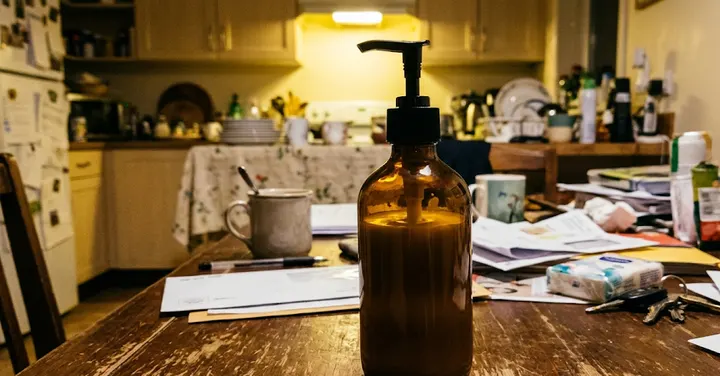 Before: phone photo
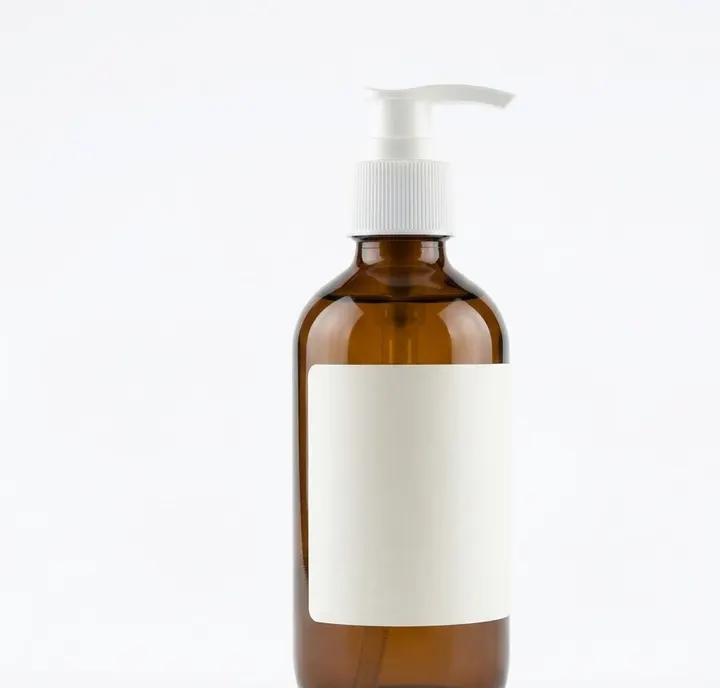 After: prompt 1
Jump to a prompt (1)
- 1. Open your AI photo app
- 2. Upload a clear photo of your product
- 3. Paste a prompt and generate
Cosmetics and skincare prompts to copy
Upload a clear photo of your real product in the AI app first, then paste a prompt. Results differ on every try, so generate two or three versions and keep the best one. Want a different outfit or background? Use the prompt builder below.
1. Serum dropper bottle on pure white
Using the uploaded photo of my serum bottle, place it upright on a pure white background (RGB 255, 255, 255) with a faint natural shadow underneath. Keep the product exactly as photographed: same glass colour, dropper shape, cap, label, logo, printed text and liquid level. Do not add or remove anything and do not redraw the label. Use soft, even studio light from both sides so the glass edges show a thin clean highlight and the label stays free of glare. No added text, no watermark. Aspect ratio 1:1.
Why it works: Amber and frosted glass can turn grey or muddy on white. Light from both sides gives the glass a clean edge highlight while keeping the label readable, which is what a main listing image needs.
Make it yours: If your bottle is clear glass with a pale serum, add 'place a very light grey reflection under the bottle so the edges stay visible on white'.
About these prompts
Beauty listings carry a particular risk. An image can suggest a result the product cannot deliver, such as flawless skin, removed spots or whiter teeth. Many marketplaces and ad platforms restrict before and after images and health or skin claims in beauty ads, and buyers who feel misled return products. So nothing on this page shows a changed face or a skin result. If you want to show texture, show the product itself as a swatch or a drop.
For bathroom shelf, water, botanical or pastel scenes, use the product prompt builder further down this page. The sections below cover glossy and frosted packaging, how to show shade and texture honestly, and which props suit each product type. Results vary between attempts, so try the prompt more than once and compare the label with your real pack.
Build your own Cosmetics and skincare product prompt
Using the uploaded photo, create a professional e-commerce product photograph of the product, on a pure white (#FFFFFF) seamless background. Lighting: soft, even studio softbox lighting. Angle: front view. Shadow: a soft, natural contact shadow under the product. Show only the product, centred and filling about 85% of the frame, sharp from edge to edge. Keep the product exactly as in the uploaded photo: same shape, size, colour, material, label, logo and quantity. Do not add, remove or redesign any part of it. No added text, no watermark, no extra products. Aspect ratio 1:1.
Main images on most marketplaces need a pure white background, the real product only and no added text. Check your marketplace's current image rules.
Glossy, frosted and metallic packaging
Cosmetic packs are often glossy, frosted or metallic, and each one reacts to light differently. Glossy surfaces show hard reflections, frosted glass can look grey and flat, and metallic caps pick up colour from the surroundings. Tell the model what the packaging is made of and how you want the light to behave.
| Packaging | Common problem | What to add to the prompt |
|---|---|---|
| Glossy plastic tube | Strong white glare over the label | soft diffused light, keep the label free of glare |
| Frosted glass | Looks grey and muddy on white | light from behind and both sides so the frosted glass glows softly |
| Amber or dark glass | Looks black, liquid not visible | backlight so the amber colour shows through |
| Metallic or gold cap | Picks up colours from props | neutral surroundings, clean reflection on the cap |
| Clear glass with clear liquid | Edges disappear on white | thin dark edge lines, faint grey reflection under the bottle |
| Matte paper box | Looks flat and dull | gentle side light to show the box edges |
Showing shade and texture without showing results
Buyers want to know the colour, texture and finish of a beauty product. The honest way to show this is a swatch of the real product on a neutral surface such as white paper, glass or a white card. Avoid AI images of faces, lips or skin wearing your product. The model invents the skin and the result, so the photo becomes a promise you cannot keep.
- Use daylight-balanced light and a neutral grey or white surface for shade images.
- Write 'do not shift the colour warmer, cooler, brighter or darker' for any shade product.
- For creams and gels, describe the real thickness: runny, light lotion, thick cream, whipped butter.
- Do not add shimmer, glitter or gloss that your product does not have.
- Never use before and after images or images that show spots, wrinkles or dark circles removed. Many ad platforms restrict these, and marketplaces often reject them.
- If you want a real person in your images, photograph a real person using your product with their consent, and keep the photo unedited apart from light and crop.
Keep claims in your listing text, where you can support them with your label and documents. Words such as 'whitening', 'anti-acne' or 'clinically proven' should not appear in the image at all. The marketplace product photo rules guide explains what main images usually allow.
Scenes and props by product type
The scene should match how and where the product is used. A sunscreen reads well outdoors, a night cream reads well in warm lamp light, and a toner reads well near water. Keep props generic and unbranded, and only show ingredients that appear on your label.
| Product | Scene | Props | Light |
|---|---|---|---|
| Serums and face oils | pale stone or glass shelf | a drop on glass, label-listed botanicals | backlight through the glass |
| Creams and butters | pastel beige or bathroom counter | open lid, swatch on glass, towel | soft upper-left light |
| Sunscreen and body lotion | outdoor stone ledge | leaf, small dab of product | strong clear sun |
| Lipstick and lip tint | light grey surface | swatch on white paper | daylight-balanced studio |
| Soaps and bars | wet stone, wooden dish | one real herb from the recipe | side light for texture |
| Kits and combos | bathroom shelf or open gift box | towel, tissue paper | bright morning window |
For more scene ideas, see the lifestyle product prompts. For sizes each store asks for, see the product image sizes guide.
Frequently asked questions
Can I show a model with glowing skin using my cream in an AI image?
It is better not to. An AI generated face shows a result your product did not create, which can mislead buyers and break marketplace and ad rules on beauty claims. Show the product and a swatch, or use a real, consented photo of a real person.
Why does the AI change my lipstick shade?
Colour shifts with light and background. Use a neutral grey or white surface, ask for daylight-balanced light and add a line saying the shade must not shift warmer, cooler, brighter or darker. Always compare the final image with the real product in daylight.
Can I add SPF or dermatologist tested badges to the image?
Do not ask the AI to add badges or claims. Keep only what is already printed on your real pack. Claims like these usually need proof and are controlled by local cosmetic rules and marketplace policies, so they belong in your listing text with evidence.
What background should I use for the main listing image of a cosmetic?
Most marketplaces ask for a pure white background for the main image, with the product filling most of the frame. The serum prompt on this page does that, and you can change the bottle description to match your product. Keep scenes for your other images.
How do I stop the AI adding flowers or fruit that are not in my product?
Say clearly that only ingredients listed on your label may appear, name them, and add a line that no other leaves, flowers or fruits should be added. If it still adds them, reply asking it to remove them and keep everything else the same.
New to AI photo editing? Start with how to edit photos with Gemini or with ChatGPT.
More prompt ideas
Helpful guides
- Marketplace photo rulesWhat online stores expect from a main product image: plain background, product filling the frame, no text or watermarks, and honest edits when you use AI.
- Product image sizesProduct image sizes and ratios for Shopify, Etsy, eBay, Google Merchant Center and Facebook ads from official seller help pages, plus the ratio to ask for.
- Best photo for AI editingWhich photo to upload before an AI edit: light, angle, distance, resolution, filters, glasses and group shots, with a quick checklist table and phone tips.