Food Product Photography AI Prompt for Sellers
These prompts are for home kitchens, small brands and shopkeepers who sell packed food: namkeen and chips, masala and spice blends, achar, mithai boxes, cookies, cakes, sauces and bottled drinks. You take one clear photo of your own product on a plain surface, upload it to an AI image app, and paste the prompt below to get a clean main listing photo. It asks the app to keep your pack exactly as it is, with the same label, colour, logo and quantity.
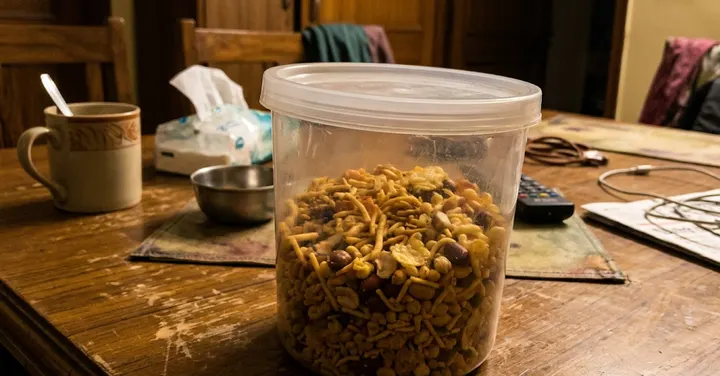 Before: phone photo
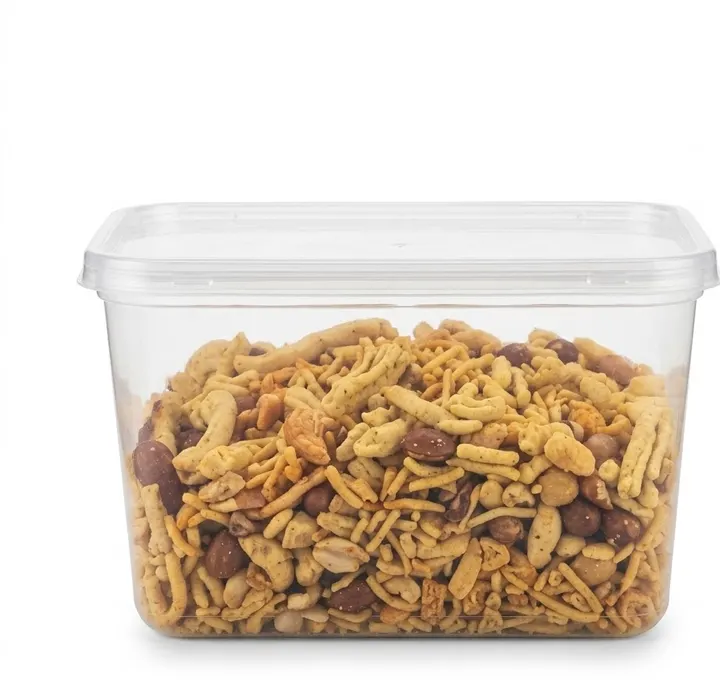 After: prompt 1
Jump to a prompt (1)
- 1. Open your AI photo app
- 2. Upload a clear photo of your product
- 3. Paste a prompt and generate
Food products prompts to copy
Upload a clear photo of your real product in the AI app first, then paste a prompt. Results differ on every try, so generate two or three versions and keep the best one. Want a different outfit or background? Use the prompt builder below.
1. Snack pack on pure white for the main image
Using the uploaded photo of my snack pouch, place the pack upright on a pure white background (RGB 255, 255, 255) with a very soft shadow directly under it. Keep the product exactly as in my photo: same pouch shape, same printed label, colours, logo, weight text and any seal or zip. Do not add or remove anything, do not redraw or correct the printed text, and do not add snacks spilling out. Straighten the pack so it faces the camera, remove wrinkles only if they hide the label. Even studio light with no colour cast. No added text, no watermark. Aspect ratio 1:1.
Why it works: AI models tend to rewrite small printed words on packets, which can change your weight or ingredient line. Saying 'do not redraw the printed text' keeps the label as your camera saw it, and banning spilled snacks stops the model from inventing contents.
Make it yours: If the pouch is shiny and shows white glare, add 'reduce glare on the plastic so the label is readable, keep the real colours'.
About these prompts
Food has a special honesty problem. An AI model likes to make food look richer than it is, adding extra cashews to a sweet, a thicker cream layer to a cake or more pieces in a jar. A buyer who receives something smaller or plainer than the photo leaves a bad review and may ask for a refund. Whatever you ask for, tell the model to show the real portion and to add no toppings or ingredients your product does not contain.
The prompt on this page is for the pure white main image, since most marketplaces ask for it. For kitchen, table or festive scenes, use the product prompt builder further down this page or the lifestyle product prompts. Below the prompt you will find tables on steam and condensation, props that match each food type, and how to handle veg, halal and ingredient information without making claims. Results vary between attempts, so run the prompt two or three times and keep the one that matches your product best.
Build your own Food products product prompt
Using the uploaded photo, create a professional e-commerce product photograph of the product, on a pure white (#FFFFFF) seamless background. Lighting: soft, even studio softbox lighting. Angle: front view. Shadow: a soft, natural contact shadow under the product. Show only the product, centred and filling about 85% of the frame, sharp from edge to edge. Keep the product exactly as in the uploaded photo: same shape, size, colour, material, label, logo and quantity. Do not add, remove or redesign any part of it. No added text, no watermark, no extra products. Aspect ratio 1:1.
Main images on most marketplaces need a pure white background, the real product only and no added text. Check your marketplace's current image rules.
Steam, condensation and freshness: what to ask for
Food photographers use steam, droplets and backlight to show that something is hot, cold or fresh. An AI app can add these too, but the default is usually too much. Thick cartoon steam and big drops look fake, and they can cover your label. Use the words in the right-hand column and keep them small.
| Effect | Good for | What to write | What to avoid |
|---|---|---|---|
| Steam | Tea, coffee, soup premix, ready meals | thin, soft steam rising and fading quickly, dark background, light from behind | thick white clouds, steam over the label |
| Condensation | Cold drinks, juices, dairy, ice cream tubs | light, realistic droplets on the glass only | drops on paper labels, running water that hides the logo |
| Backlight glow | Oil pickles, honey, syrups, sauces in glass | soft light from behind so the liquid glows | making the liquid a brighter or different colour |
| Crumbs and breaks | Cookies, rusk, cakes, chips | one piece broken in half to show the inside | extra fillings or chips that are not in your recipe |
| Sprinkled spice | Masala, chilli, turmeric | a small heap of the same powder in front | whole spices that are not in the blend |
If an effect hides your label, send a follow-up such as 'remove the droplets from the label area and keep everything else the same'. Changing one thing per message usually works better than rewriting the whole prompt.
Props that suit each food type
A prop should tell the buyer how the food is used or where it comes from. It should never look like part of what they are buying. If a bowl of cashews sits next to your namkeen, a buyer may expect cashews inside. Pick props that clearly read as serving items or background, and mention them in your listing text if there is any chance of confusion.
| Product | Props that help | Surface and colour |
|---|---|---|
| Namkeen and chips | a plain steel bowl with a small serving, a cup of tea | light wood or white marble, warm light |
| Spices and masala | a small heap of the powder, a brass spoon, real whole spices from the blend | dark slate or old wood, side light |
| Pickles and chutneys | a steel spoon, a plain paratha on a plate, cotton cloth | wooden windowsill, morning backlight |
| Sweets and mithai | diya, marigold petals, a gift ribbon | red, gold or cream cloth, warm light |
| Cakes and bakery | cake stand, plain plates, a cake server | pastel wall, soft window light |
| Drinks | ice cubes, a plain glass, a fruit only if it is in the drink | stone or tile, cool background, rim light |
| Dry fruits and seeds | small open bowls of the same contents | linen or jute, top-down light |
Honesty rules for food listing photos
Food photos set expectations about taste, quantity and ingredients. Marketplaces generally ask that listing images show the actual product the buyer will receive, and many sellers lose ratings when the photo promises more than the pack. Keep these rules for every image, whether it is a white main image or a lifestyle ad. For the main image rules on common marketplaces, read our marketplace product photo rules.
- Show the real portion. If a box holds 12 pieces, the photo shows 12, at their real size.
- Add no ingredient, topping, garnish or filling that the product does not contain.
- Keep the food's real colour. Do not ask for redder chilli, greener pista or more golden fried snacks.
- Keep veg, non-veg, halal or other marks exactly as printed on your pack. Do not ask the AI to draw or add a certification symbol. Only official marks you are entitled to belong on the pack itself.
- Do not add words like 'healthy', 'sugar free' or 'organic' to the image. Those are claims, and local food rules usually control how they are used on labels and ads.
- Check the final image against your real pack, word by word, before you upload it.
Taking the photo you upload
The AI can only keep what it can see. Photograph the pack in daylight near a window, on a plain table, with the label facing the camera and nothing covering it. Wipe jars and bottles first, because fingerprints and oil smears get copied. For sweets and cakes, shoot the real item you sell on the day it is made, from the angle you want in the final image. Our guide on the best photo to upload covers light and focus in more detail.
Use 1:1 for most marketplace main images, 4:5 for social feeds and 9:16 for status or story ads. The product image sizes guide lists the pixel sizes common stores ask for. When you need a scene behind a product, the lifestyle product prompts give more surfaces to try.
Frequently asked questions
Can I use an AI edited photo as the main image for my food listing?
Usually yes, as long as it shows the real product on the background the marketplace asks for, often pure white, and does not add anything the buyer will not receive. Each marketplace has its own rules, so read its seller help pages before you upload.
Why does the AI keep adding nuts or toppings to my sweets?
The model has seen many decorated sweets and fills in what it expects. Say exactly what must stay the same, including the number of pieces and the garnish already on them, and say which items must not be added. If it still adds them, reply asking it to remove them and keep everything else unchanged.
The AI changed the words on my label. What should I do?
Small printed text is hard for image models. Add a line telling it not to redraw or change any printed text, and check every word. If the text still changes, use the AI only for the background and place your real pack photo on top in a simple design app, or use a plain edited photo for label shots.
Can I show my product as halal or vegetarian in the image?
Show only the marks that are already printed on your real pack, exactly as printed. Do not ask the AI to draw a certification logo or symbol. Certification marks belong to the body that issues them, and adding one you do not hold can break food and marketplace rules.
How do I make steam look real?
Use a dark background, light coming from behind the cup, and ask for thin steam that fades quickly. Keep the steam away from the pack and label so the product stays readable.
Which aspect ratio should I use for food product photos?
Use 1:1 for most marketplace listings, 4:5 for social feed posts and 9:16 for stories and status ads. Ask for the ratio in the prompt so the app does not crop your pack.
New to AI photo editing? Start with how to edit photos with Gemini or with ChatGPT.
More prompt ideas
Helpful guides
- Marketplace photo rulesWhat online stores expect from a main product image: plain background, product filling the frame, no text or watermarks, and honest edits when you use AI.
- Product image sizesProduct image sizes and ratios for Shopify, Etsy, eBay, Google Merchant Center and Facebook ads from official seller help pages, plus the ratio to ask for.
- Best photo for AI editingWhich photo to upload before an AI edit: light, angle, distance, resolution, filters, glasses and group shots, with a quick checklist table and phone tips.