Professional Headshot AI Prompt for LinkedIn and Resumes
A good professional headshot is simple: your face clearly visible, good light, a plain or softly blurred background, neat clothes and a friendly expression. Booking a photographer is not always practical, so many people now turn a decent phone photo into a cleaner headshot with an AI app that edits an uploaded photo.
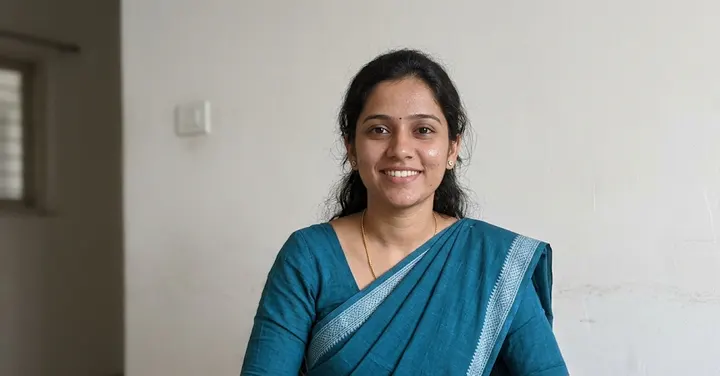 Before: plain selfie
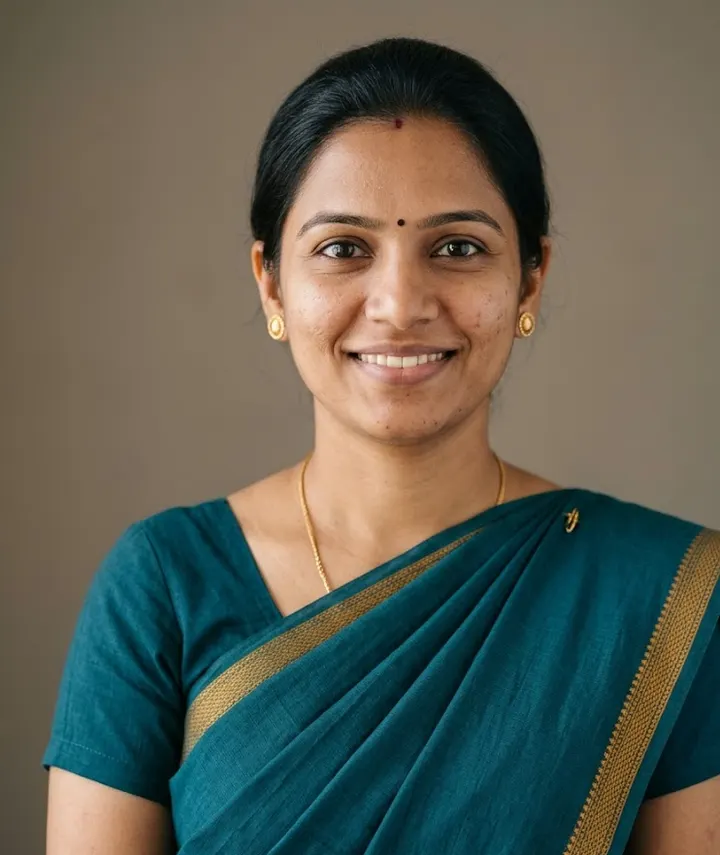 After: prompt 1
Jump to a prompt (1)
- 1. Open your AI photo app
- 2. Upload a clear photo of yourself
- 3. Paste a prompt and generate
Professional Headshot prompts to copy
Upload your own photo in the AI app first, then paste a prompt. Results differ on every try, so generate two or three versions and keep the best one. Want a different outfit or background? Use the prompt builder below.
1. Cotton saree for a professional profile
Edit this photo into a professional headshot of the woman wearing a crisp cotton saree in deep teal with a narrow contrast border, pallu neatly pinned on the left shoulder, and small gold studs. Plain warm-grey backdrop, soft even light, no harsh shadows. Head and upper shoulders in the frame, face centred, a composed and friendly expression. Keep her face, skin tone, bindi if any, and features exactly as in the uploaded photo, with natural skin texture. Realistic photo, sharp eyes. Aspect ratio 4:5.
Why it works: A cotton saree with a neatly pinned pallu is common professional wear in India and photographs cleanly. A narrow border keeps attention on the face rather than on the fabric.
Make it yours: Use 1:1 for LinkedIn and 4:5 for a staff page or resume. For a silk look on a formal bio, ask for "a handloom silk saree in a muted colour with a thin zari border".
About these prompts
The prompt here is deliberately restrained. It changes the clothes, background and light while keeping your face, skin tone and features exactly as they are. That matters more here than anywhere else on this site, because the person who meets you for an interview should recognise you from your photo.
The ready-made prompt on this page is a cotton saree headshot on a plain warm-grey backdrop. For a suit, blazer, kurta, hijab or any other outfit, use the prompt builder below: pick the person, outfit, backdrop and framing, and it writes a prompt with the same keep-your-face rules. After that is a short guide to what recruiters usually look for, and an honest note on when a real photo may be the better choice. If your face changes in the result, read how to keep your face the same.
Build your own Professional Headshot prompt
Using the uploaded photo, create an ultra-realistic photograph of the man from the photo, wearing a sharp tailored suit, in front of a plain studio backdrop. Style: shot on a professional DSLR with an 85mm lens, natural skin texture and sharp focus. Lighting: soft, even studio lighting. Framing: close-up portrait framing from the shoulders up. Use a natural, confident pose and a relaxed expression. Keep the face exactly as in the uploaded photo: same facial features, skin tone, hairstyle and age. Do not beautify, slim or change the identity. Correct hands and fingers, no text, no watermark, no extra people. Aspect ratio 1:1.
Open Gemini, attach your photo with the + button, paste the prompt and send. If the face drifts, reply "keep my face exactly as in the original photo" and regenerate.
What recruiters and hiring teams usually expect
There is no single rule, but most people who review profiles look for the same few things in a headshot. These are general expectations, and your industry or the company may differ.
- It looks like you, today. A photo that is years old or heavily edited causes a small moment of doubt when you meet.
- Your face is clear: head and shoulders, eyes visible, no sunglasses, nothing covering the face.
- A simple background: plain, softly blurred office or outdoor shade. No party scenes or other people cropped out.
- Clothes you would wear to work in your field. A suit for some roles, cultural formal wear such as a kurta or saree for others, a neat casual shirt for many tech jobs.
- A friendly, natural expression. A slight smile tends to look more approachable than a serious stare.
- Good light with no strong colour filters, so your skin tone looks as it does in real life.
An honest note on AI headshots
An AI headshot should still look like you. If the result has smoother skin, a sharper jaw, whiter teeth or a younger face than you really have, it works against you: the interviewer meets a different person from the one in the photo. That is why the prompt here asks the app to keep your face, skin tone and natural skin texture exactly as in your photo.
Some employers, recruiters or professional platforms may prefer a real photo, and some people consider heavily AI-generated photos misleading. If a job application or platform gives guidance on photos, follow it. When in doubt, ask only for a plain background and even light, and leave your clothes as they are. That stays closest to a real photo.
Do not use an AI headshot for official documents such as passports, visas, ID cards or exam forms. Those have strict photo rules and usually need an unedited photo of you. Also read is it safe to upload photos to AI before uploading your photo to any app.
Clothes and background by field
Use this as a starting point. Your own workplace is the best guide, so look at how senior people in your field present themselves.
| Field | Clothes to describe | Background to describe |
|---|---|---|
| Banking, finance, law | Dark suit or blazer, formal shirt, or a crisp cotton or silk saree | Plain mid-grey or dark slate studio backdrop |
| Tech, product, design | Plain T-shirt with an overshirt, knit sweater, smart casual shirt | Softly blurred co-working space or solid colour |
| Healthcare | White coat over a light shirt, or scrubs | Blurred bright clinic, or plain light grey |
| Teaching and research | Cardigan or blazer with a collared shirt, cotton saree, kurta | Blurred bookshelves or classroom |
| Founders and consultants | Kurta with Nehru jacket, bandhgala, open-collar blazer | Bright office with plants, or warm-grey backdrop |
| Sales and client-facing roles | Blazer with an open collar, neat formal shirt | Blurred office or outdoor open shade |
Crop and size for LinkedIn and resumes
LinkedIn shows your photo in a circle, so use a 1:1 square with your face centred and a little space above your head. For a resume, staff page or speaker bio, 4:5 or 3:4 gives a more traditional portrait shape. The aspect ratio guide explains how different platforms crop images.
Start from a sharp, well-lit photo where you face the camera. The better your source photo, the less the app has to invent, and the more the result looks like you. Our guide on the best photo to upload explains what to look for.
Headshots by profession
Some jobs have their own photo habits. Doctors and clinic staff usually wear a white coat against a calm clinic background. Teachers and researchers often choose a bookshelf or classroom, kept soft and out of focus. Developers and designers tend to skip the suit for a plain T-shirt and an overshirt. Write these into the outfit and background lines of the prompt above, or pick them in the prompt builder.
If your company wants everyone to match on a team page, agree on one prompt and change only the person and outfit lines. Keep the same backdrop colour, light direction and aspect ratio for everyone, and ask each colleague to upload a front-facing photo taken in similar light. Founders who need a press or pitch-deck photo can ask for a kurta with a Nehru jacket or a bandhgala against a warm-grey backdrop.
Frequently asked questions
Is it okay to use an AI headshot on LinkedIn?
Many people do, but it should still look like you. Keep your real face, skin tone and age, and avoid beautifying edits. Some employers or platforms may prefer real photos, so follow any photo guidance they give.
What background is best for a professional headshot?
A plain mid-grey or soft off-white backdrop suits most people and fields. A softly blurred office or outdoor shade works well for a more relaxed, environmental look.
What should I wear in an AI professional headshot?
Describe what you would actually wear to work in your field. That may be a suit or blazer, a cotton or silk saree, a kurta with a Nehru jacket, a bandhgala, a hijab or turban styled as you usually wear it, or a neat casual shirt for many tech roles.
Can I use an AI headshot for a passport or visa photo?
No. Official document photos have strict rules and usually need an unedited photo of you. Use AI headshots only for profiles, resumes and websites where edited photos are acceptable.
Why does my AI headshot look younger or different from me?
Apps sometimes smooth skin and refine features by default. Ask the app to keep your face, skin texture and age exactly as in the photo and not to beautify or slim, and regenerate if the result still drifts.
Which aspect ratio should I use for a headshot?
Use 1:1 for LinkedIn and other circular profile photos. Use 4:5 or 3:4 for resumes, company staff pages and speaker bios.
New to AI photo editing? Start with how to edit photos with Gemini or with ChatGPT.
More prompt ideas
 3D FigurineThe desk figurine trend3 prompts
 New YearMidnight sparkle for New Year 20271 prompt · 1 Jan
 DiwaliDiyas, rangoli and festive glow3 prompts · 8 Nov
Helpful guides
- Keep your face the sameWhy AI photo edits change your face, and practical fixes: better source photos, keep-face wording, one change per message and when to start over.
- Best photo for AI editingWhich photo to upload before an AI edit: light, angle, distance, resolution, filters, glasses and group shots, with a quick checklist table and phone tips.
- Is it safe to upload photos?What Google and OpenAI say about storing your chats and photos, human review, training opt-outs, deleting and age limits, plus safe habits for families.