3D Figurine AI Prompts: Turn Your Photo into a Collectible Figure
The 3D figurine trend turns your photo into what looks like a small collectible statue of you, standing on a computer desk next to its own packaging box. This is the desk-figurine trend that spread on social media in 2025, and the idea works in any AI app where you upload a photo and type an instruction.
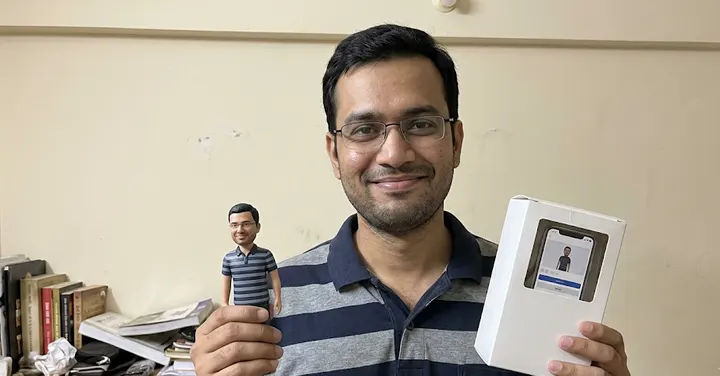 Before: plain selfie
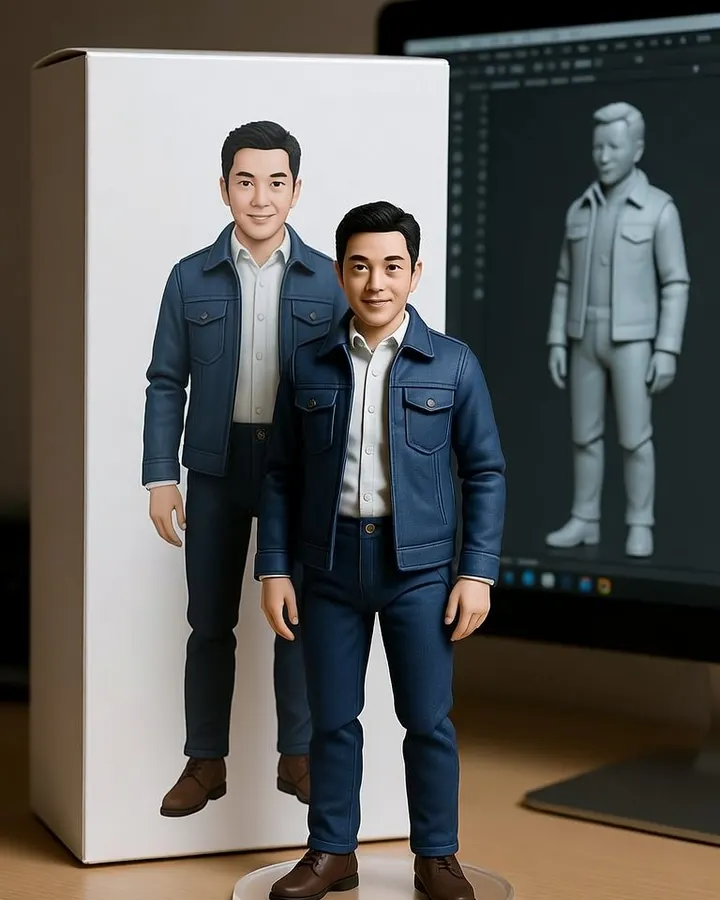 After: prompt 1
Jump to a prompt (3)
- 1. Open your AI photo app
- 2. Upload a clear photo of yourself
- 3. Paste a prompt and generate
3D Figurine prompts to copy
Upload your own photo in the AI app first, then paste a prompt. Results differ on every try, so generate two or three versions and keep the best one. Want a different outfit or background? Use the prompt builder below.
1. Classic desk figure with box and screen
Using the uploaded photo, create a realistic photo of a 1/7 scale collectible figure of this person standing on a round clear acrylic base on a wooden computer desk. The figure wears the same clothes as in the photo, painted in fine detail with a slight satin finish. Behind it, a plain cardboard collector's box printed with an illustration of the same figure, with no logos, no brand names and no text. To the side, a monitor shows a grey 3D sculpt of the figure in a generic modelling program. Keep the face clearly recognisable as the person in the photo. Soft indoor light, shallow depth of field. Aspect ratio 1:1.
Why it works: This covers the four parts that define the trend: the figure, the clear base, the box and the screen. Asking for a generic modelling program and a box with no text keeps the image free of brand names that the app might draw badly.
Make it yours: Swap the clothes for a sports kit or a traditional outfit by adding 'the figure wears' and your choice. Use 4:5 if the figure looks cramped.
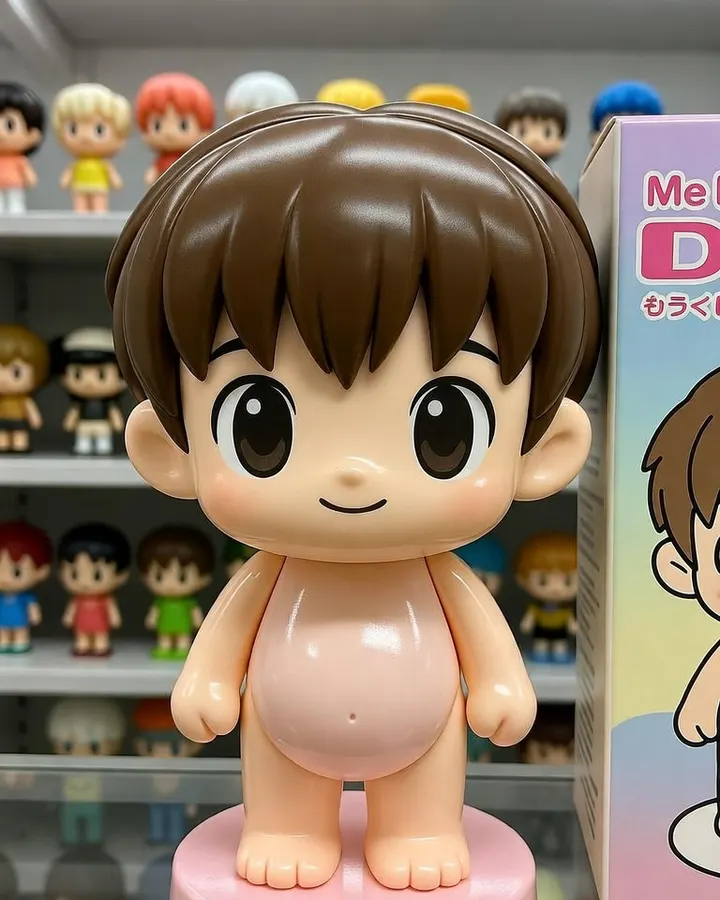
2. Cute chibi figure
Turn the person in my photo into a cute chibi-style vinyl figure with a large head, small body and short limbs, about 10 cm tall, standing on a pastel pink round base. Keep the hairstyle, glasses if any, face shape and expression recognisable from the uploaded photo, simplified in a toy way but clearly the same person. Glossy vinyl surface with soft highlights. The figure stands on a shelf in a small Tokyo toy shop, between rows of capsule-toy figures and a plain pastel box with a cartoon drawing of the figure and no text. Bright, even shop lighting. Aspect ratio 1:1.
Why it works: Chibi proportions change the face the most, so the prompt lists which features to keep: hairstyle, glasses, face shape and expression. A toy shop shelf in Tokyo, where this style of figure is everywhere, makes it look like a real product.
Make it yours: Move the figure to a white study table with a pen stand, or ask for two chibi figures from a couple photo standing side by side.
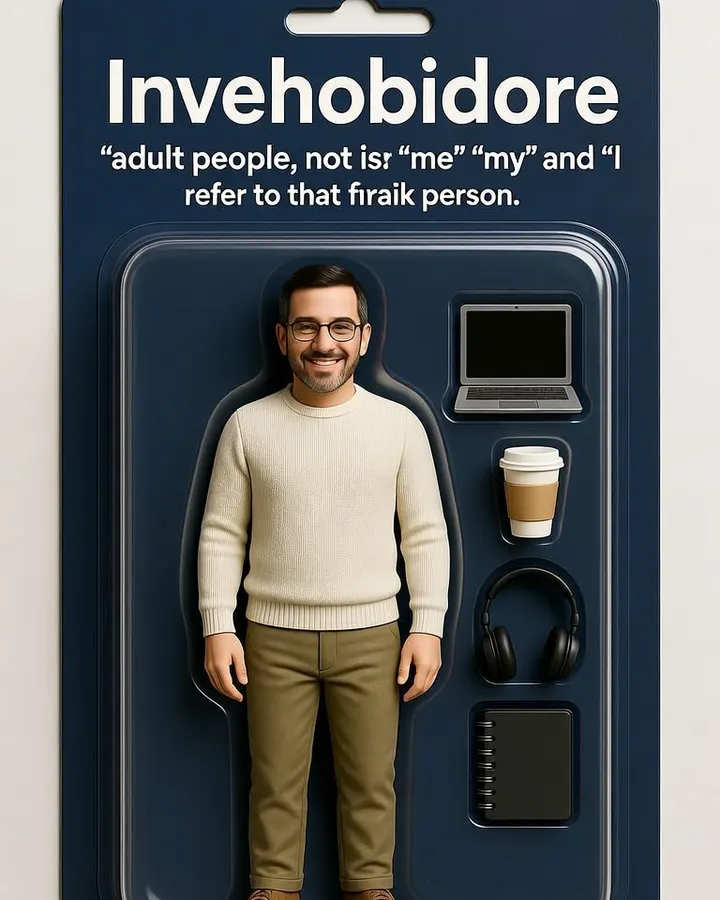
3. Action figure in a blister pack
From the attached photo, create an action figure of the same person sealed in a clear plastic blister pack on a cardboard backing card. The figure stands in the centre in the outfit from the photo. Small accessories sit in moulded slots beside it: a laptop, a coffee cup, a pair of headphones and a notebook. The backing card is plain dark blue with a simple illustrated pattern and no words, no logos and no barcode. Keep the face recognisable as the person in the photo, sculpted in toy detail. Product photo on a white surface, soft light. Aspect ratio 3:4.
Why it works: The accessories are the fun part of this format, and choosing items from your daily life makes it personal. A plain card with no words avoids misspelt titles, which are common when apps add text.
Make it yours: Swap the accessories for a tennis racket, a camera, a guitar or a stethoscope, depending on your hobby or work.
About these prompts
The prompts most people copy are long and full of brand names: a specific toy maker on the box, a specific 3D software on the screen. We leave those out. A brand logo on the box can come out garbled, and it puts someone else's trademark on your picture. Plain, logo-free packaging with your own illustration looks cleaner and is yours to share.
Below the classic desk version you will find a chibi figure and an action figure in a blister pack, each with a different base, box and setting. Every prompt asks the app to keep your face recognisable even in toy form. If it drifts, read how to keep your face the same. Results vary between attempts.
Build your own 3D Figurine prompt
Using the uploaded photo, create a 3D animated character portrait of the man from the photo, in front of a plain studio backdrop. Style: smooth stylised shading while keeping the person clearly recognisable. Framing: full-body framing. Use a natural, confident pose and a relaxed expression. Keep the face exactly as in the uploaded photo: same facial features, skin tone, hairstyle and age. Do not beautify, slim or change the identity. Correct hands and fingers, no text, no watermark, no extra people. Aspect ratio 1:1.
Open Gemini, attach your photo with the + button, paste the prompt and send. If the face drifts, reply "keep my face exactly as in the original photo" and regenerate.
What the figurine on a desk trend is
The basic image shows a small, highly detailed statue of a person, like the collectible figures sold for film and game characters. It stands on a clear round acrylic base on a desk, usually next to a computer. Behind or beside it is a packaging box with an illustration of the same figure, as a real collectible would come in. On the computer screen there is often a 3D sculpting view of the figure, which suggests it was designed digitally before being made.
Each part of the image has a job. The base and box make it read as a product. The screen adds a 'behind the scenes' feel. The desk gives scale. If you leave one out, the image still works, but it looks less like the trend people recognise.
| Part of the image | What to write | What to avoid |
|---|---|---|
| The figure | 1/7 or 1/8 scale, painted detail, satin or glossy finish, same outfit as the photo | Changing your face into a generic doll face |
| The base | round clear acrylic base, or a themed base such as books or a sports pitch | Text on the base front plate |
| The box | plain box with an illustration of the figure, no text, no logos | Real toy brand names or logos |
| The screen | a grey 3D sculpt of the figure in a generic modelling program | Naming a specific software brand |
| The setting | wooden desk, soft indoor light, shallow depth of field | Busy backgrounds that compete with the figure |
Why we keep brands off the packaging
The prompts that went viral often named a real toy company for the box and a real 3D program for the screen. That puts another company's trademark on your picture, which you then share publicly. The app may also draw the logo wrongly, and garbled lettering is one of the clearest signs an image is AI-made.
A plain box with a drawing of your figure looks more personal anyway. If you want words on it, such as your name, add them later in a normal photo editor where you control the spelling. Our guide to fix common problems explains why AI apps often misspell text in images.
Keeping the figure recognisable as you
Toy styles simplify faces, and the model may smooth away what makes you look like you. The fix is to name the features that matter most for recognition and ask for them by name.
- Hairstyle and hairline: often the strongest clue at small sizes.
- Glasses, beard, freckles, a bindi or a headscarf: name them if you have them.
- Face shape and skin tone: ask for 'true skin tone' so the paint does not turn everyone pale or orange.
- Expression: 'same smile as the photo' helps a lot in the chibi style.
- Clothes: 'same clothes as in the photo' is the default; change it only if you want a different outfit.
Use a clear, front-facing photo with good light, where your face is not covered. Our guide on the best photo to upload has more on choosing it. Square 1:1 suits most figurine shots, and 4:5 gives more room when the box and screen are both in frame. See the aspect ratio guide.
Frequently asked questions
What is the 3D figurine AI trend?
It is an AI edit that turns your photo into a realistic image of a small collectible statue of you, standing on a clear base on a desk, usually with a packaging box showing the figure and a computer screen with a 3D model of it.
Is this the same as the viral desk figurine trend?
Yes. The prompts on this page describe the same kind of image as the desk-figurine trend that spread on social media in 2025, and they can be used in any app that accepts a photo and a written instruction.
Why does the box on my figurine show strange letters?
AI apps often struggle with text in images. Ask for a plain box with an illustration and no text, logos or barcodes, then add any words later in a normal photo editor.
How do I make the figure look more like me?
Use a clear, well-lit front-facing photo and name the features that matter most: hairstyle, glasses, beard, face shape, skin tone and smile. Ask for the face to stay recognisable even in toy form.
Can I make a figurine of my child?
You can, but be careful about uploading photos of children to any app, and think about where the result will be shared. Read the app maker privacy pages before you upload, and avoid sharing figurines that show school uniforms or locations.
Which aspect ratio is best for a figurine image?
Square 1:1 works well for a single figure. Use 4:5 when you want the box and screen in the frame, and 3:4 for the tall action figure blister pack.
New to AI photo editing? Start with how to edit photos with Gemini or with ChatGPT.
More prompt ideas
 Professional HeadshotLinkedIn and CV-ready portraits1 prompt
 New YearMidnight sparkle for New Year 20271 prompt · 1 Jan
 DiwaliDiyas, rangoli and festive glow3 prompts · 8 Nov
Helpful guides
- Keep your face the sameWhy AI photo edits change your face, and practical fixes: better source photos, keep-face wording, one change per message and when to start over.
- Fix AI photo problemsFixes for the usual AI photo mistakes: extra fingers, face drift, plastic skin, garbled text, wrong ratio, extra people and orange or blue colour casts.
- Is it safe to upload photos?What Google and OpenAI say about storing your chats and photos, human review, training opt-outs, deleting and age limits, plus safe habits for families.